Actions
Bug #3093
openDVH Export to CSV
Start date:
22/06/2026
Due date:
% Done:
0%
Estimated time:
Description
Starting in the OnkoDICOM Individual Patient Curation,
- select the patient C210C8F.... and open all 4 available files (CT, RTSTRUCT, RTPLAN and RTDOSE).
- If it asks whether you want the DVH calculated, say YES.
- Go to the DVH tab and select Export DVH to CSV.
- Use your file manager to navigate the the new CSV folder in the C210C8F.... directory.
- Open the CSV file.
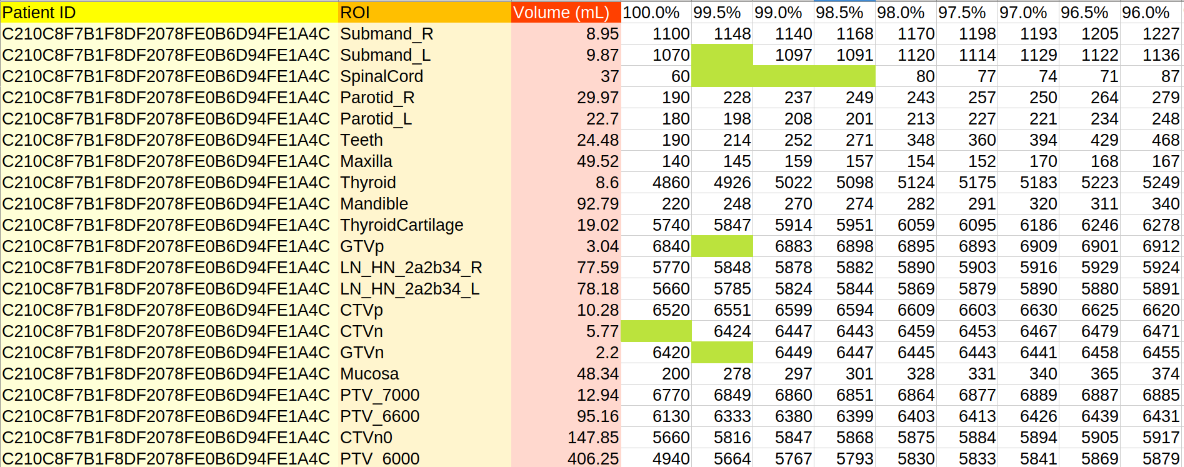
- The first column contains the patient ID
- The second column contains the Region of Interest (ROI) name.
- The third column contains the volume of the ROI.
- The fourth and subsequent columns contain the dose in cGy received by the specified portion of the ROI. In this case 100% of the ROI called PTV_7000 received a dose of 6770 cGy (this means that all of that ROI received 6770 cGy OR MORE, i.e., the minimum dose is 6770 cGy). There always has to be a minimum dose!
The problem is the blank entries, e.g., the CTVn dose. 99.5% of the ROI gets 6424, but 100% receives nothing, not even 0 cGy. There should be no blank entries at all in any column
Files
No data to display
Actions